
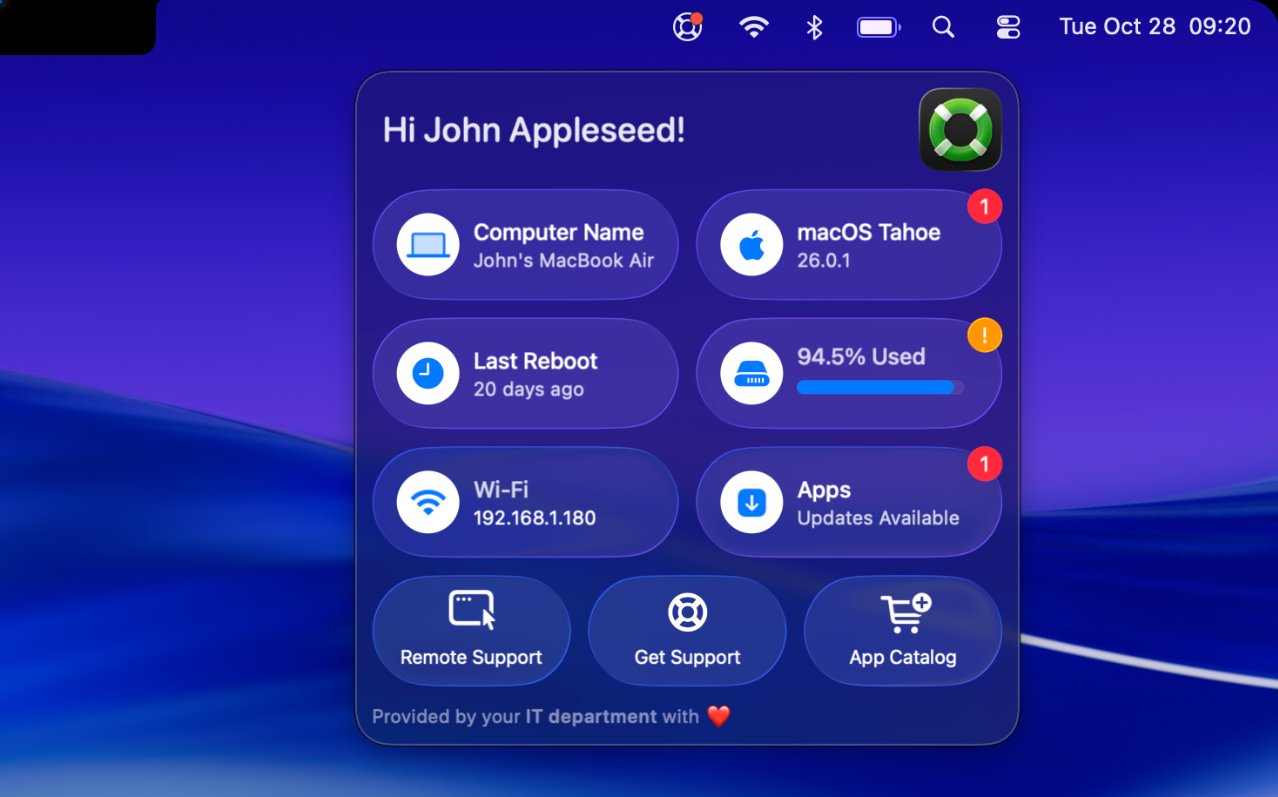
Introducing Support App 3.0. Our biggest update ever.
A completely new design built with Liquid Glass for macOS 26, providing a delightful native experience while still integrating with the organization’s identity and feeling instantly familiar. It’s also the most accessible release yet, for both users and administrators.
What’s New
✨ New design for macOS 26 with Liquid Glass: Items have been reshaped to capsules with native glass effect, matching the new Control Center. The glass allows the background to shine through with light refractions and specular highlights for an incredible experience.
🧩 Full item/button flexibility: How rows and items are defined have been completely restructured to adopt a modular approach. Countless new possibilities open up with full flexibility to add rows and items however you like including unlimited extensions.
🎛️ Configurator Mode: This new mode can be used by administrators to completely configure, visualize and test Support App right from within the app itself. This makes configuration and prototyping much more efficient, removes implementation barriers and makes it easier than ever to implement Support App in any Device Management Service. It can even export a property list or complete mobileconfig file.
🌐 Accessibility: Native accessibility features for VoiceOver, Voice Control and more have been greatly enhanced so all users can benefit from Support App. Additionally, organizations requiring an accessibility assessment for every app will now be able to deploy Support App as well.
🔘 Small circular button: A new small circular button type is added which allows a row to support up to four buttons (macOS 26 and higher)
🛟 New icon: A new icon optimized for macOS 26
There is more:
– Color option for menu bar icon
– Support for Privileged Scripts deployed using Service Background Tasks (Declarative Device Management) in a tamper protected location
– Every Extension can support its own OnAppearAction to fetch updated information
Download Support App here: https://lnkd.in/e_UD2Ved
New documentation is moved to the Wiki: https://lnkd.in/eEm_Rm_e
Hope you like the new version as much as we do!